
Google Apps Script in Hindi: Sikho kaise Google Sheets ka 30 mins ka kaam 30 Sec mein without tech background.Google Sheets ki Complete automation (2026 Guide)
Google apps script ek powerfull tool hai jiski help se ap apne manual and repetitive tasks ko easily automate kar sakte ho. Agar ap Google Sheets, Docs, Gmail and other product of Google frequently use karte ho toh Google Apps script apke liye kise jadu ki chadi se kam nhi hai.
Google Apps Script in hindi (What is GAS)
Google Apps script ko short mein “GAS” bhi kaha jata hai, Yeh ek cloud-based javascript platform hai jo ki Google ka product hai and Google Workspace (G-Suite) ke almost sabhi product ko apas mein connect aur automate karne ka bhi kaam karta hai.
Google apps scipt ko ap Google Sheets, Doc, Gmail, Google Drive en sabhi ko easily connect kar sakte ho and automate kar sakte ho via writing code
Google Sheets ka 30 mins ka kaam 30 Sec mein (Jaadu!)
Man lijiye ki apke pas ek Master Sheets mein Sales Data hai, Apko daily morning 9 am har city ka data alag alag tabs (City wise Sheets) mei copy paste karna padta hai jo ki kafi manual work hai and time consuming hai sabse badi bat bhot boring hai.
Yahi kaam Google sheets mein Google Apps script ke through 30 seconds mei ho jayega woh bhi 4 ya 5 lines ke code mein toh hua na jaadu? aur sabse best part hai ki GAS ka ek feature hai “Triggers” esko ap ek time yani specific time par set kr sakte ho and yeh khud execute ho jayega.
Jab ap subah login krogey toh apka work apko finish milega kyuki yeh server side par run hoga apko login krne ki zrurt nahi hai.
Important Points for Google Apps Script
- Installation: Kuch bhi install karne ki zrurt nahi hai
- Charges: Yeh bilkul free hai, Google koi fees nahi leta
- Language Type: Yeh javascript based hai (V8 engine)
- Server side: Yeh google ke cloud par hi run hoti hai
- Intregrations: Ap SQL Server, MySQL, Whatsapp, Telegram and kisi bhi third-parties se esko connect kar sakte ho
- Technical background: Esko sikhne ke liye technical background hona zruri nahi hai
First Google Apps Script Code kaise likhe?
Agar ap mujhe step-by-step follow krege toh ap easily apna pehla code likh sakte ho , maine ek youtube video banai hai jisko ap dekh saktey hai complete playlist for Google apps script in hindi.
- Google Sheets (Google Spreadsheet) ko Open karo
- Menu se Extensions > Apps Script par click kro
- Editor Interface: Apko ek code editor window dikhne lgegi
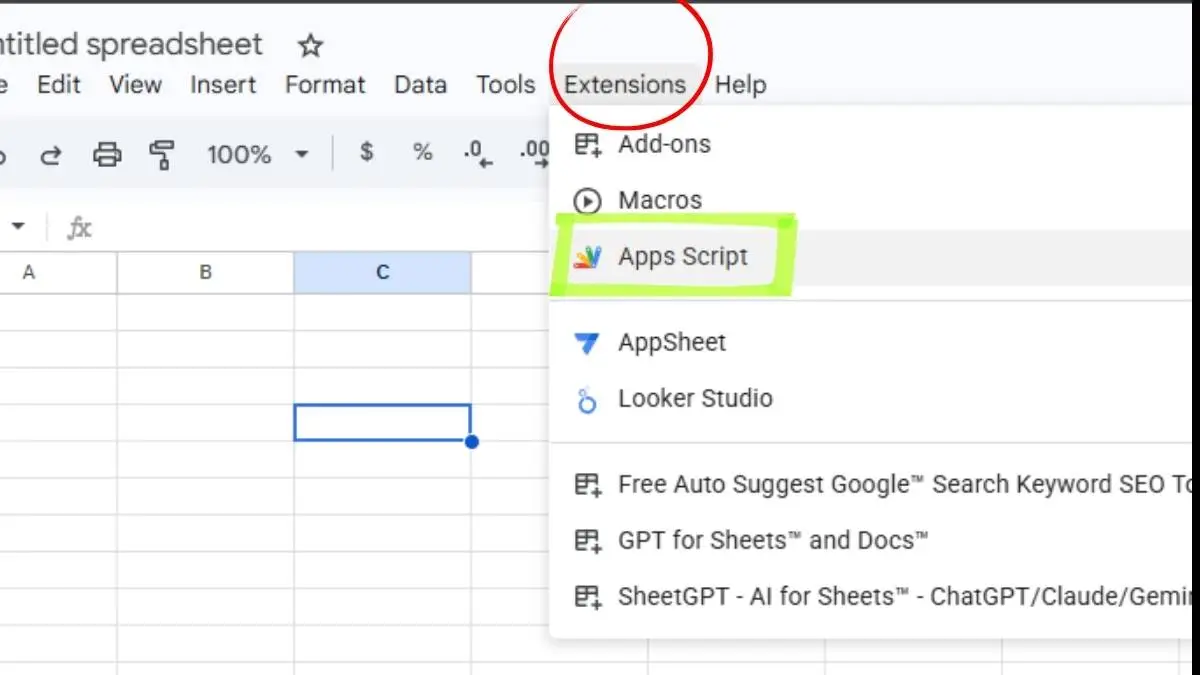
4. Code editor mein pehle se kuch code likha hoga (myFunction), usey pura select karke delete kar dein
5.Ab niche diye gaye code ko copy karke editor mein paste kardo
function myFirstScript() {
  var ui = SpreadsheetApp.getUi();
  ui.alert("Mubarak ho! Fasih, aapka pehla automation script chal gaya.");
}6. Save Kijiye and (CTRL + S) ap code save kar sakte ho ya upper floppi ka icon hoga usse bhi save kar sakte ho
7. Ab Run par click krogey to apka code run ho jayega,
For better undestanding ap upper di gayi video ko dekh saktey hai.
Features of Google Apps script 2026 updates
Google Apps script ek complete ecosystem hai jiske through apne manaul task ko automate kar sakte hai, Third-Party se connect kr sakte hai, maine neeche kuch Main Features category wise divide kiya hai.
1. Google Sheets Automations
- Custom Menu & Side Bars: Ap Sheets mei kisi bhi name se Custom menu bana sakte ho and side bars ko rename kar sakte ho
- Data Manipulation: Kuch lines of code ke through ap data ko read / write / delete kar sakte ho, Data ko clean kar sakte ho
- Auto-Formatting: Based on criteria ap rows / columns / table data ko adjust kar sakte ho, Border bhi kiya ja sakta hai color kiya ja sakta hai yani jo chiz ap sheets mein kar sakte ho woh sabhi chizey ap Google apps script ke zariye kar sakte ho.
- Custom Functions: Ap kisi bhi name se apna ek function bana saktey ho based on your logic and requirement.
- Dashboard: Ap easily data ki summary bna kar present kar sakte ho, Charts bna sakte ho jo automatic update hote rhe.
- Conditions: ap apne data set par jo logic lgate ho for example ap ek sheets se dusri sheets mei data ko copy paste karna hai ya phir apne data par kuch formulas lga rakhe hai jaise, countif, sumifs , vlookup ETC toh yeh sab activity ap bhot aasani se google apps script ke through kar sakte ho.
- Data Analysis: Ap data ko analyze kar sakte ho and meangful information ko extract karke summary bana sakte ho.
2.Communication & Notifications Automation in Google Apps script
- Auto-Email (GMAIL):
- Sheets ke data ke base par ap personalized email bhej sakte ho even with attachment
- Kisi cell ki value change hone par ap email notification ka automation kar sakte ho
- Drive mein new file aayi hai eska bhi ap ek email notiication client ya boss ko bhej sakte ho
- Sheets ke Column A ya kisi bhi column mein email-IDs hai un sabhi ko ap bulk mein personalized email kar sakte ho woh bhi one click ya auto set par.
- WhatsApp & Telegram Integration: Third-Party APIs google apps script support karta hai and APIs ka use karke ap WhatsApp and Telegram integration easily kar sakte ho and messages bhej sakte ho.
- Google Forms / HTML Forms: Ap Google apps script ke zariye Forms bana sakte ho even jab user form ko submit kre to automatic reply ya notification send ho jaye email/whatsapp kahi bhi jaha bhi ap set kro.
3.Google Apps Script Data Integration & Third-Parties
- External Databases: SQL Server , MySQL and oracle se data direct import/export kara ja sakta hai
- Google Apps script web app: GAS ka use karke ek complete Web form ya inventory system banaya ja sakta hai
- Google Drive Management: Google apps script se ap apne Google drive ko puri tarah manage kar sakte ho.
- Drive mei koi new file bana saktey hai
- New folder ban jayega / Existing folder ko delete kar sakte ho
- Sara data kisi ek folder mei daal sakte ho
- User ko kya access dena hai , kisko remove karna hai sab set kiya ja sakta hai
4.Google Apps script Advanced Triggers (The Automation Engine in GAS)
- Time-Driven: Ap apne code ko kisi specific time par schudule / Set kar sakte ho (e.g, Every Tuesday at 9am) so ab apka laptop band ho ya khula ho apka automation khud hi run ho jayega kyuki Google apps script server side par run hoti hai
- Event-Driven: Jab Google sheet ke cell ki value change ho, ya drive mei koi file delete ya add ho, ya phir Google form user ne submit kiya ho then apka code run ho jayega . Ap apne logic and requirement ke hisab se Google apps script ke Triggers feature ko set kar sakte ho
Conclusion
Mera bas yahi kehna hai ki agar ap apne skills ko aur better karna chahtey ho toh apko google apps script sikhna chaiye, jaisa ki mein already explain kar chuka hun ki esko sikhne ke liye technical background ka hona bilkul bhi zaruri nahi hai.
Maine Youtube par Google apps script full tutorial ki playlist banai hai ap usko dekh sakte ho, mein neeche apni Google apps script ki first video ko daal raha hun ap first chapter dekho and koi doubt ho toh comment mein ap puch sakte ho mein answer karta rehta hun.
FAQ
Kya Apps Script seekhne ke liye paise lagte hai?
NO, Ap easily khud ghar bethe sikh sakte hai, ya ap mujhe youtube par follow kar sakte hai for free Google Apps script tutorial in hindi.
Kya hum mobile se Apps Script likh sakte hai?
Yes, You can ap likh saktey ho but Desktop use krogey toh zyada visibility rahegi.
Kya Google apps script sikhne ke liye technical background hona zaruri hai?
NO, Apko technical background ki bilkul zarurt nahi hai, ap aasani se esko samjh sakte hai.
Google apps script kya javascript hai?
NO, Google apps script javascript based hai, (V8 engine) Google ne esme extra features add kiye hai.
Google apps script ke liye hme kya download karna hai?
Apko kuch download ya install karne ki zarurt nahi hai.

1 thought on “Google Apps Script in Hindi: 30 mins ka kaam 30 sec mein”